
Home Network and WiFi FAQ

Why is my Wi-Fi strong in some rooms but weak in others?
Wi-Fi performance can be affected by distance, walls, floors, building materials, interference, and access-point placement. Larger or multi-story homes often need multiple strategically placed wireless access points to provide reliable coverage throughout the property.
What is a professionally designed home network?
A professionally designed home network combines the right router, switches, wireless access points, cabling, and configuration to provide reliable connectivity throughout the home. It is designed around the home’s size, construction, connected devices, and coverage requirements rather than relying on a single Wi-Fi router.
What is the difference between a router and a wireless access point?
A router manages traffic between your home network and the internet. A wireless access point provides Wi-Fi coverage in a particular area. Larger homes can use multiple access points connected to the network to provide more consistent coverage.
Do larger homes need multiple Wi-Fi access points?
Often, yes. A single wireless router may not provide consistent coverage across a large, multi-level, or unusually constructed home. Multiple professionally placed access points can distribute Wi-Fi coverage more effectively throughout the property.
Is a professionally installed Wi-Fi system different from a mesh Wi-Fi system?
Yes. Consumer mesh systems are designed for relatively simple installation, while a professionally designed network can use strategically located wired access points, managed networking equipment, and purpose-built infrastructure. The right approach depends on the size, construction, and connectivity requirements of the home.
Should TVs and streaming devices use Wi-Fi or Ethernet?
When practical, stationary high-bandwidth devices can benefit from a wired Ethernet connection. TVs, streaming devices, AV equipment, computers, and other permanent equipment can often be hardwired, leaving Wi-Fi capacity available for phones, tablets, laptops, and mobile devices.
Will better Wi-Fi make my internet faster?
Not necessarily. Your internet speed is determined partly by the service from your internet provider, while your home network determines how effectively that connection reaches your devices. Improving the network can resolve coverage and connectivity problems, but it cannot increase the internet service delivered to the home.
Why does my internet speed test look fast, but streaming still buffers?
A fast internet connection doesn’t guarantee strong connectivity everywhere in the home. Weak Wi-Fi, congestion, interference, network equipment, or the connection between a particular device and the network can contribute to inconsistent streaming.
Can you eliminate Wi-Fi dead zones in my home?
A professionally designed network can significantly improve coverage by identifying problem areas and positioning access points appropriately. The exact solution depends on the home’s size, construction, interference, and areas where reliable connectivity is needed.
Can Wi-Fi coverage extend to my patio, pool, or outdoor living areas?
Yes. Outdoor-rated wireless access points and proper network design can extend coverage to patios, decks, pools, outdoor entertainment spaces, detached structures, and other areas around the property.
Can Wi-Fi reach a detached garage or guest house?
Often, yes. Depending on distance, terrain, structures, and available infrastructure, detached buildings can be connected using appropriate wired, fiber, or wireless networking solutions. The best approach depends on the property.
Does my smart home need a good home network?
Yes. Many smart-home devices, control systems, streaming products, and connected technologies rely on the home network. A reliable network provides an important foundation for lighting control, automation, audio/video systems, and other connected technology.
Does whole-home audio need a strong network?
Network-connected audio systems and streaming services rely on dependable connectivity. A properly designed network can help music streaming, app control, and connected audio devices operate reliably throughout the home.
How important is the network for a home theater?
A reliable network is increasingly important for streaming video, downloading content, controlling connected AV equipment, and integrating a theater with other smart-home systems. Hardwired connections may also be appropriate for certain home theater components.
How many Wi-Fi access points does my home need?
There isn’t one number that works for every home. Square footage, number of floors, construction materials, floor plan, outdoor areas, device count, and access-point locations all affect network design. A professional network design determines coverage based on the property rather than simply adding more access points.
Can too many connected devices slow down my home network?
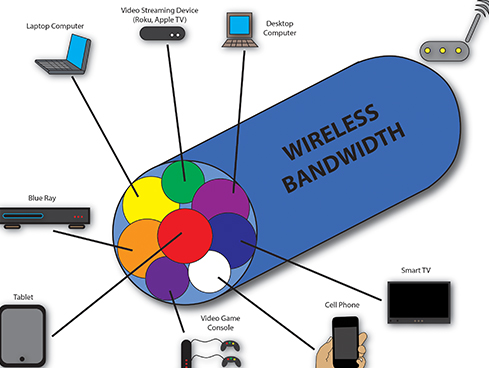
They can contribute to network congestion, particularly when many devices are simultaneously streaming, transferring data, or competing for wireless capacity. Network design should account for both the number of connected devices and how those devices are actually used.
Can you install a separate guest Wi-Fi network?
Yes. A properly configured network can provide separate wireless access for guests while keeping primary household devices on another network. Depending on the networking platform, additional segmentation options may also be available.
Can a home network be installed in an existing house?
Yes. Existing homes can often be upgraded with new networking equipment, wireless access points, and hardwired connections where practical. The design will depend on existing cabling, construction, room layout, and the areas requiring coverage.
When should I plan my home network during new construction?
As early as possible. New construction is an ideal opportunity to plan Ethernet cabling, wireless access-point locations, AV connections, equipment locations, outdoor coverage, and capacity for future technology before walls and ceilings are finished.
Can you upgrade an older home network?
Yes. An existing network can be evaluated to identify issues with wireless coverage, outdated equipment, cabling, access-point placement, or system configuration. In many cases, parts of the existing infrastructure can be retained while problem areas are upgraded.
How much does a professionally installed home network cost?
Cost depends on the size and construction of the home, number of access points, network equipment, cabling requirements, outdoor coverage, and existing infrastructure. A professional network should be designed around the property and its connectivity requirements rather than a standard equipment package.
Who installs home networks and Wi-Fi systems in Asheville, NC?
Harmony AVL+media designs and installs home networking and distributed Wi-Fi solutions in Asheville and Western North Carolina, including wireless coverage and hardwired connections for entertainment, smart-home technology, and everyday internet use.
ADDRESS
Harmony AVL+media
936 Tunnel Rd
Asheville, NC 28805
CALL US
Sales: 828.250.9800 x-4
Support: 828.250.9800 x-2
8:30-5:30PM EST Monday-Friday
Sales: sales@harmonyinteriors.com
Support: support@harmonyinteriors.com
Demos and Meetings By Appointment